


This tutorial is for the interface and features of Version 1.1 of DREN-URBA.
With the release of Version 2.0 in November 2015, some features have been modified, as you will see in the corresponding tutorials.
The approach for modeling Urban Drainage Systems with DREN-URBA is very similar to what would be done in the manual calculation: establish the hydraulic characteristics of the streets in the studied sector for, depending on the results, controlling the flood spread through the installment at adequate points in storm drain inlets that allow stormwater catchment.
Thus, the Superficial Urban Drainage System is configured, in which the stormwater catchment associated with certain frequency (return period) and duration is performed.
We will see, through an example, the steps for creating this superficial drainage system, focusing on the important aspects that must be taken into account with respect to the data introduction in DREN-URBA’S Streets Editor Dialog.
Information Needed to Perform the Urban Drainage Design with DREN-URBA
Before starting the creation process of the Superficial Urban Drainage System, it is necessary that we have the following information:
Topographic map of the urban area to study. In the next image, our example sector is shown:

Additionally, the land uses are known: The whole area is planned for residential (single family homes) use, but we have indicated other uses like the Park (P) and Commercial (CC).
Let’s look at the information that we must extract from plans and maps and how to use DREN-URBA to perform the stormwater drainage system design:
- Street Width (or widths, if there are different types of streets in the sector under analysis). In this case, the constant street width across the whole sector is 9 m, with sidewalks on each side of 1 m wide and curbs of 0.15 m high.
- Street cross slope, in percent. In DREN-URBA, it is possible to specify a cross slope for each street’s margin, although this is not the most frequent condition. For our example, the cross slope is 2% on both street’s sides.
- Length and Longitudinal slope of each street. As seen in the previous image, each road section has indicated the respective longitudinal slope. The length will be read directly from the drawing.
- Drainage Areas (sub basins), in Hectares, at each street’s margin. For each use or land cover, the value of the area, as well as the respective runoff coefficient to be used in the Rational Formula for calculating the rainfall peak flow, shall be determined. In our example, we have the following uses:
|
Use/cover |
Runoff Coefficient |
|
Pavements and sidewalks |
0,95 |
|
Residential (single family homes) |
0,70 |
|
Parks |
0,30 |
|
Commercial |
0,80 |
Other parameters that must be included for storm drainage inlet design with DREN-URBA are:
- Maximum Allowable Width of Spread at each street’s margin. For our example, based on the characteristics of the urban sector, and assuming the road classification as “local streets,” we have chosen a value of 3 m at each edge of the street, so as to maintain, upon the design rainfall occurrence, a free width of 3 m for emergency vehicle traffic.
- Intensity-Duration-Frequency data for the return period to be used in the urban drainage design. In our example, a return period of five years and a minimum rainfall duration of 5 min will be used. The following intensities have been extracted from the Intensity-Duration-frequency curve for the region (for five years of return period):
|
Duration (min) |
Intensity (mm/hr) |
|
5 |
187 |
|
10 |
130 |
|
15 |
101 |
With this information at hand, we are ready to start using DREN-URBA, so let’s see the steps to follow:
1Once the Software is loaded, go to the File menu and click New. A new blank project is generated wherein the Streets in our example sector will be created so as to conform the Superficial Urban Drainage System. 2Since all the streets of the sector under study have the same geometry, it is convenient to use the Default Values Settings option in DREN-URBA to minimize the process of creating and editing Streets. With the data from the urban sector, we would have the following view for the Default Values Dialog (Project menu→Default Values Settings):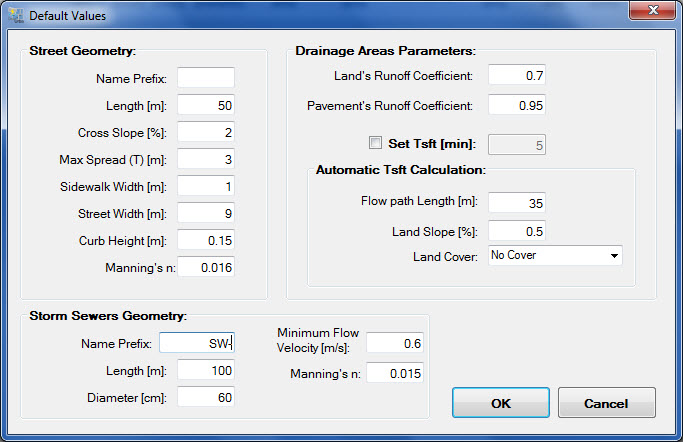
Click OK to close the dialog and return to the main window.
3The next step involves the creation of the Intensity-Duration-Frequency table for our project, according to what we’ve seen in this tutorial. 4Next, we have to start creating streets so as to define the Superficial Urban Drainage System; for it shall be specified, for each street’s margin or side, the values requested by DREN-URBA. But first it is important to consider the following:- It is advisable to start the streets creation from the most downstream one (based on the sector’s general runoff path) and, from here, make the creation of the upper streets until the most upstream one.
- Based on the above, the street’s margins (left and right) will be defined based on the upslope, i.e., inversely related to the flow path (longitudinal slope) of each street:

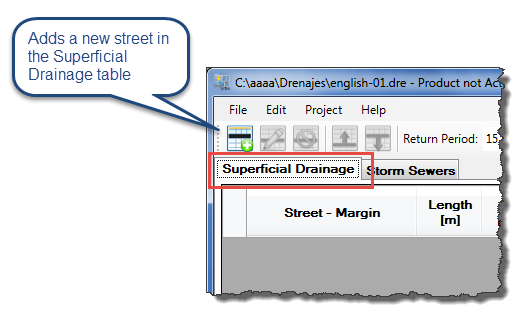
Thus, let’s start with the creation of the most downstream street, the E4-E3, ensuring the Superficial Drainage tab is active and clicking the Insert Street button:
The Streets Editor will be shown, and we’ll enter the highlighted data in the figure below (remember that much of the information will be automatically entered based on what was previously established in Default Values Settings):
Geometry Tab:

One aspect to consider is relative to the list on the Geometry Tab’s top right. Here’s where the “streets’ network” (thinking in stormwater drainage flow paths) is specified. Thus, we have the following situations:
- Only one Street Discharging must exist at <<None>> option, being this street the most downstream one in the Superficial Drainage System under study.
- For the remaining streets, you must specify at which margin of the receiving street is the actual one discharging; there may be situations such as those highlighted in the following image:

Drainage Areas Tab:
In this tab, the affluent drainage areas other than Pavements and Sidewalks must be specified for each street’s margin.
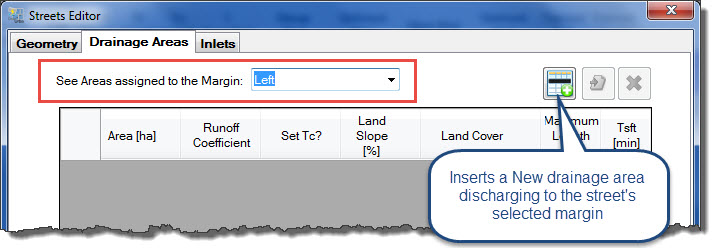
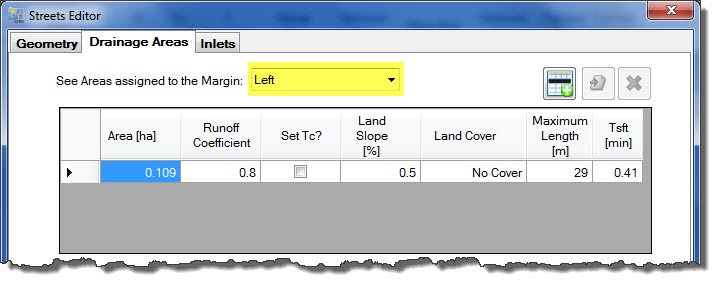
Thus, we’ll select the Left option in the See Areas Assigned to the margin field and click the Insert drainage area button:
The Drainage Areas dialog will be shown, in which we’ll enter the following data:
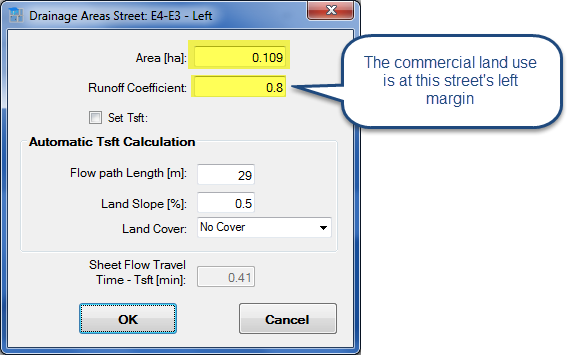
We have also modified, besides the runoff coefficient assigned by default, the value of the flow path length from the parcels to the street’s left margin, although this does not represent a significant change in the calculated surface concentration time.
Click OK to close the Drainage Areas dialog and return to the left margin table:
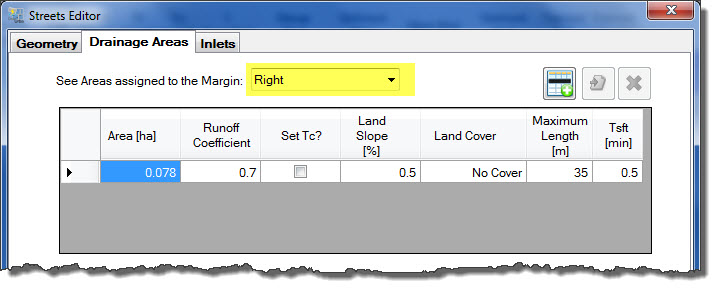
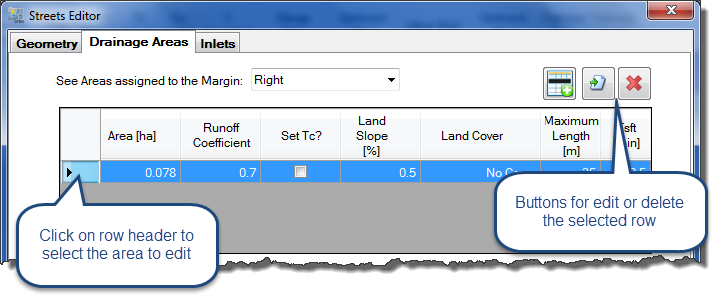
Now let’s change to the Right margin, to perform the same sequence and finally get a view like this:
Inlets Tab
This tab is where we’ll specify the type and characteristics of the Storm Drain Inlet that will be part of the superficial catchment system at each street’s margin, if necessary.
By now, while the runoff flow calculation is not performed, we will not specify any Storm Drain Inlet on the margins of our streets, in order to get an overview of the system performance without inlets; then, depending on the results obtained, we will be establishing if they´re really necessary.
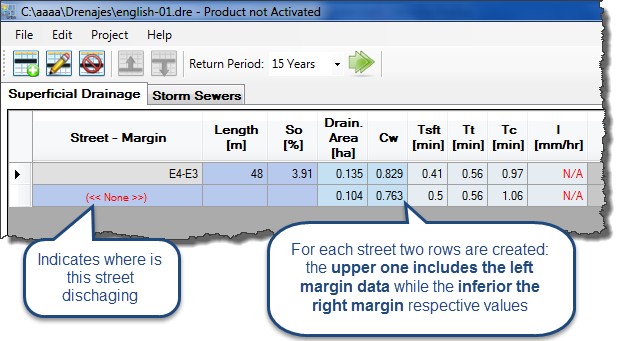
Click OK to close the Streets Editor, and see that an entry has been created, with two rows, on the Superficial Drainage table:
Let’s introduce, in the same way as with the first street, the remaining streets, in order to obtain the following table:

Performing the Superficial Urban Drainage parameters calculation and determining the Need for Stormwater Catchment using Drain Inlets
Now that the Superficial urban drainage system is configured, it is time to run the calculation for the five years return period so we can get the hydraulic parameters at each side of each street.
Click on the Start the Calculation button, after selecting the five years return period:

If there are no errors, a message dialog will be shown on the screen, informing us that the calculation has been successful. After closing this dialog, we shall see the Superficial Drainage table with the updated values.
For this analysis, we will go to the right side of the table to determine where, if any, the allowable spread width (3 m) has been exceeded:

As we see, there are four streets that have exceeded the design spread on both margins, thus indicating the need to configure a Stormwater Collection System through the use of drainage inlets.
Among the many possible solutions for the configuration and combination of the Stormwater Drainage Inlets in the streets with problems, we have chosen to use the Curb-opening Generic inlet with a window length of 3 m. The following results are obtained after changes are done:

Here we see that the design spread requirement is satisfied by placing eight drainage inlets for collecting the stormwater in the studied area.
– Superficial urban drainage system with no stormwater Drainage inlets
– Superficial urban drainage system with stormwater Drainage inlets