


This tutorial is for the interface and features of Version 1.1 of DREN-URBA.
With the release of Version 2.0 in November 2015, some features have been modified, as you will see in the corresponding tutorials.
One of the relevant features of DREN-URBA, our Software for stormwater drainage systems design, is the definition of the basic data that will be used to create the different “hydraulic” objects available inside the application.
With this feature it is possible to set, in advance, the values that will be used by the software for the stormwater design and calculation, which will result in less time spent by the user in data entry, thus achieving a calculation model with little or no error caused by bad typing of any of the involved parameters.
Thus, when creating a new project, the first thing we suggest you do is to select the Default Values Settings option under DREN-URBA’S Project menu:
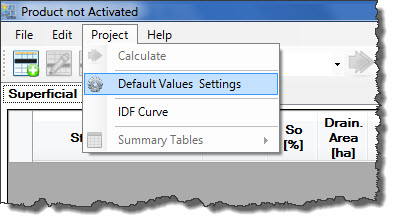
The Default Values Dialog will be shown:
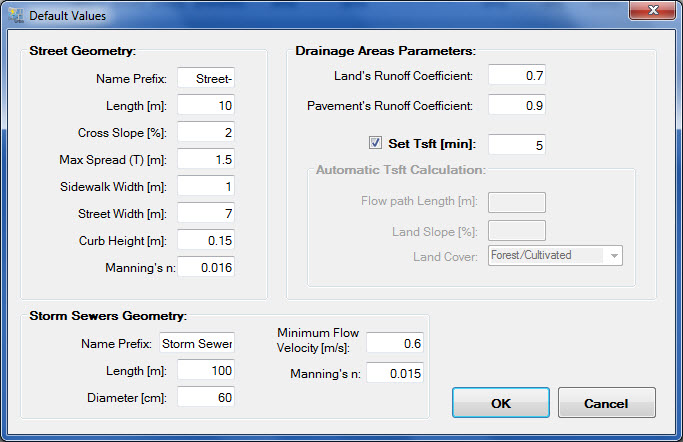
where you will find three groups of data with the information that will be used to create Streets, Drainage Areas, and Stormwater Sewers that conform the Urban Drainage system that will be calculated and designed with the software.
In the specific case of the default parameters for Drainage Areas, it is important to note that the software has two options to include the land’s (at each street’s margin) Sheet Flow Travel Time (Tsft) or Superficial Concentration Time:
- Specifying a constant value, for which you must check the “Set Tsft” box and enter the respective value, in minutes. DREN-URBA will assign this default value to each drainage area added to the street’s margins in the Streets Editor Dialog→ Drainage Areas tab.
- Letting DREN-URBA perform the Sheet Flow Travel Time automatic calculation, for which the “Set Tsft” box must be unchecked so that the fields in the Automatic Tsft Calculation box are enabled:
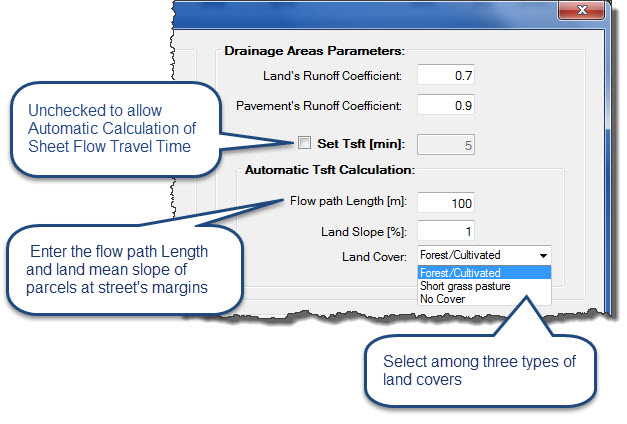
For purposes of checking normative parameters in the Urban Drainage System Design by DREN-URBA (values will be highlighted in red, in case normative parameters should not be satisfied), it is important to consider the Maximum Spread (T) at Street Geometry box and the minimum flow Velocity in the Storm Sewers Geometry box.
The Maximum Spread (T) field corresponds to the maximum allowable flood width at each street margin in DREN-URBA which, as already mentioned, is defined by regulatory aspects of Urban Drainage in each country and are related with the road’s type or use (importance).
The Minimum Flow Velocity value in the Storm Sewers Geometry box corresponds to the minimum allowable when the pipe is operating at full capacity. Urban Drainage Standards normally set this criterion to avoid sediment accumulation into the system, and that is why this value will be considered constant for all storm sewers inside your DREN-URBA’S projects.
Thus, the default parameters definition in DREN-URBA, before starting the creation of your Urban Drainage system to design or analyze, allows you to have more time to devote to analysis rather than data entry.
So, do not miss this feature in your next jobs — with our software for stormwater drainage systems design and analysis!