


The third version of our Plumbing design software includes, as a fundamental change, the drawing Windows from which it is possible now to draw the water network components and, from this drawing, to perform the calculation and design using the HUNTER’S method.
This new feature, as we have previously done with our other products, brings associated enhancements to the data and results visualization for the end user because the plan view of the water network is shown, highlighting on it, through text annotations, the diameters and lengths, among other parameters required in the project’s final documents.
Also, taking into account the requirements of some PLUMBER 2 users, we have included several improvements related to the hydraulic design and analysis that we’d like to introduce in this article.
Here you find the link to each item:
- Configuration Page
- Changes in the Drawing files Import to PLUMBER
- HUNTER’S Method Probable Flows Table Customization
- Available Node Types to be used in your Plumbing Water System’s Projects
Configuration Page
At the FILE tab, you will find the options that allow you, on one hand, to set the software settings to your country’s normative values and those that are frequently used in your designs and, on the other hand, if it’s required, to restore the defaults included in PLUMBER.

Thus you can:
Save user preferences – Using the Save Options button
When you click this button, parameters such as units, head losses calculation method, diameters, and fixture units tables, among others, which you have modified from the CONFIGURATION tab in the software’s currently opened project, will be saved so that they can be used as defaults in PLUMBER’S new projects.
In this case, it’s important to take into account that if you have defined a Fixture Units vs. Probable Flow table with different values to those provided by the HUNTER’S method, this will also be saved to be used in new projects.
Thus, the first thing to do, especially when your country’s sanitary codes use different values from those proposed in the HUNTER’S original method, is to perform the corresponding customization in the Fixtures Manager and use the Save Options buttons to keep them safe.
Restore Software’s Default Values
In the case that you wish to restore the default calculation options and units incorporated into PLUMBER, you can click the button Restore Options ensuring previously that there are no project open.
In this case, any previously done customization (also the ones that you’ve made to the HUNTER’S method table) will definitely be lost.
Software’s Language Change
When you toggle the current software’s language, a message is shown to inform you that the software must be restarted (closed and loaded again) in order to apply the modification:
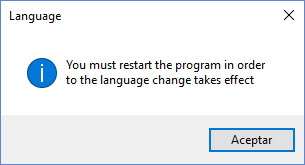
After restarting PLUMBER, you will see the language change has been applied.
It is mandatory once you have performed the language’s change and restarted PLUMBER, that you click on the button Restore Options on this page to ensure that the Equivalent Length, Diameters, and Sanitary Fixture tables take into account the new language settings.
Changes in the Drawing files Import to PLUMBER
The water network creation from objects contained inside a drawing file (DXF or DWG AUTOCAD® format), as you may think, requires that the drawing’s entities, such as lines, circles, and texts representing the water network’s components, fulfill certain conditions so that PLUMBER can adequately understand the data and adequately perform the creation of the network’s calculation model.
Thus, what we have the referred in this tutorial, created for the PLUMBER’S second version, still stands, especially the relative to the sanitary fixtures’ abbreviations as well as concerning to the separation of objects in drawing layers.
In the current version the import dialog is the following:
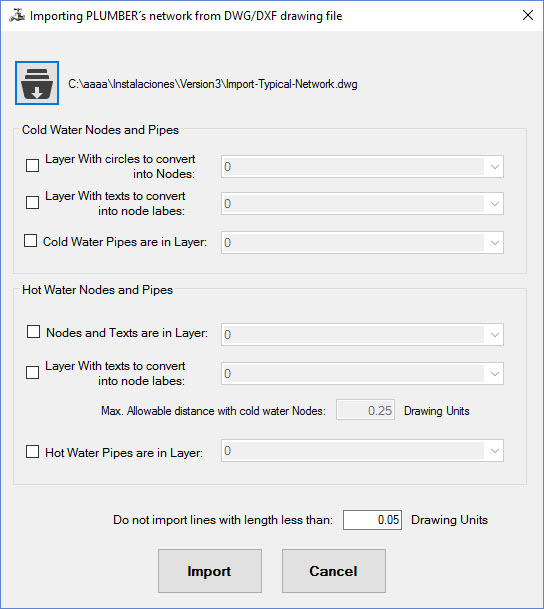
There are some improvements that you can take into account in the importing process:
- It is no longer required that the drawing files have the DXF format only. Now it is possible to perform the reading also from AUTOCAD® DWG files.
- You can use not only single line texts (AUTOCAD’S TEXT command), but also multi-line texts (AUTOCAD’S MTEXT command) are now allowed to set the nodes’ labels.
-
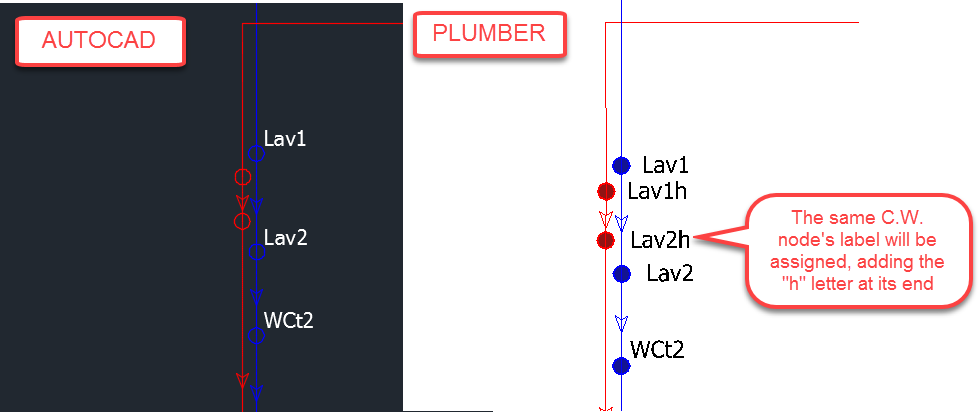
In nodes with sanitary fixtures assigned (where any of the abbreviations here have been used), it is only required to specify texts in the drawing’s cold water labels layer. In the import, an automatic label will be assigned to the nearest node in the hot water drawing’s layer. This label will contain, to differentiate it from the cold water one, the letter “h” at the end:
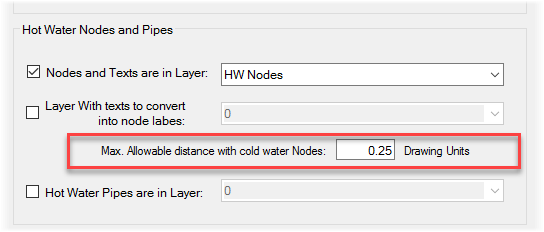
- In the import process, first, those circles grouped in the Cold Water Layer where a sanitary fixture has been specified (using the corresponding abbreviation) will be taken into account. From their respective location, the circle whose maximum distance (respect to the current cold water circle) is equal or less than the value entered in the import dialog will be searched out in the Hot Water layer:
HUNTER’S Method Probable Flows Table Customization
As already you know, PLUMBER is based on the probable flows methods (or fixture units method) proposed by Roy B. Hunter in the middle of the 20th century.
This method is based on assigning to each sanitary fixture within the building’s sanitary network a number: the Fixture Units. This value will depend on the fixtures’ characteristics, specifically concerning its water consumption rate.
Thus, defined the required water network to supply the building’s sanitary fixtures; the fixture units totaled at each pipe section (so as to supply the corresponding fixtures) allows us to determine its probable flow through the fixture units – probable flow conversion table created by HUNTER in its original probabilistic method.
By default PLUMBER incorporates the original version of this table but some research, as well as some country’s standards, have objected to its values based on motives such as that the original method “generates flows with magnitude superior to the real ones,” especially in small size plumbing systems (such as the case of single-family plumbing systems).
Although, based on our experience, we do not estimate that the HUNTER’S original method will lead to the plumbing systems’ over-design, because in most of the cases we are dealing with small diameter pipes (below 50 mm or 2”), we have attended the requirements of some PLUMBER’S users so as to include the option to modify, at your own risk, the values in the HUNTER’S table to be used in the calculation and design.
In this video, you can learn how to perform the customization described above in your plumbing water system design.
When accessing the Fixture Units Manager from PLUMBER’S CONFIGURATION tab, you´ll see a button on the upper area:
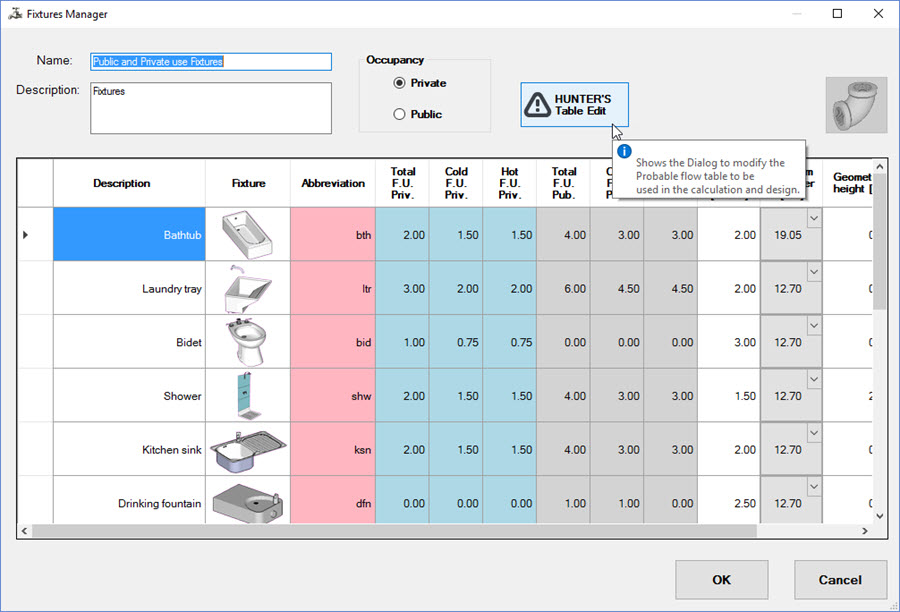
When you click on this button the following dialog is shown:

Here you find the following controls and options:
- Table to Use.
- The fixture units – probable flow values table to be used in the HUNTER’S method.
- Buttons to add or delete fixture units and probable flow values.
- Button to perform the table’s data import from MS Excel’s files.
Thus you will see that there are two options: to use the PLUMBER’S default table (as previously referred, containing the original values of the HUNTER’S method) or to use, in such a case that your country’s standards establish other values, the “User Defined” option, so as to allow you to customize the original data to your reference. In this case, you will be able to perform the modifications trough three options:
-
Applying a multiplier factor to the probable flow’s original values, in which case you must enter its value and click the button to apply it to the probable flow in columns for tank and valve fixtures:

- Manually entering the applicable data for the HUNTER’S method. Here you should use the button Add Row on the right side of the table and then introduce the corresponding values for each fixture unit. Similarly, to remove any row, click on its header to enable the Delete Button.
- Importing data from MS EXCEL files, where the data are grouped in three columns: Fixture Units – Probable flow (flush tank fixtures) – Probable flow (flush valve fixtures).
Remember, when using the Save Options button in the FILE page’s Configuration tab, this user-defined table will be saved, so that it will be available for each new project you create from PLUMBER. There’s no need to perform this customization anymore!
Available Node Types to be used in your Plumbing Water System’s Projects
Based on your project’s goal, you can create in PLUMBER several types of nodes. The basic software’s idea is that each node models the point of connection of a sanitary fixture, being able to exists for each fixture (if the case) a node in the cold water system and one in the hot water one.
But, also, you will find other types of nodes that will allow you to model virtually any kind or plumbing water system.
Thus, when you draw a node in the drawing area and access its properties dialog, you will see that when clicking on the right side of the field “Sanitary Fixture or Type of Node,” a list is shown with the types of nodes available:
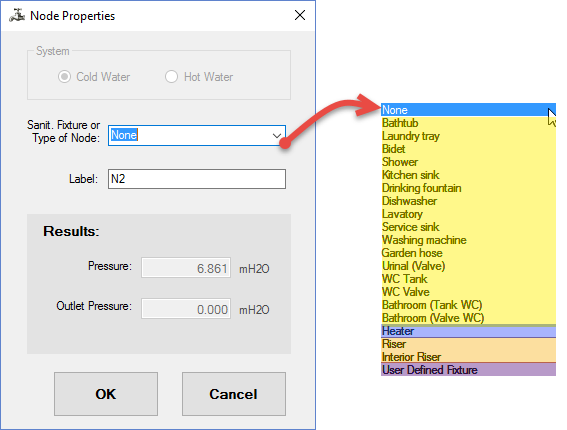
- The nodes where this option is set to None are, usually, nodes where branches exist in the flow’s path (Tees, for example). In PLUMBER it is not mandatory that a node exists in the change of horizontal alignment (elbows) because you can add vertices to pipe sections holding the Ctrl key when pipes are created in the drawing area.
- Nodes with sanitary fixtures associated (highlighted in yellow in the above image) are those that we referred to at the beginning and are those where the fixture units entered in the fixtures manager will be assigned in order to perform the calculation and design. In this video, it is explained how to perform the PLUMBER’S customization in order to satisfy your country’s standards.
- The Heater type node allows the setting of localization, at each water network, of the water heater device. For each Heater created in any water network, there must exist one node of this type in the cold water system as well as one in the hot water system.
- The Riser Node is the one that will set into the software where the water network’s source point is located.It is mandatory that each water network has one node of this type (unless an Interior Riser is specified as its source’s point, as we will explain later) because it is in this node that the required supply pressure will be calculated in order to satisfy the operating pressure of the most unfavorable sanitary fixture. In this example, you will see how we have applied this type of node in conjunction with the Plumbing Riser definition in a Multi-family building’s plumbing water system.
-
The Interior Riser node type allows the interconnecting of two water networks within one PLUMBER’S project. Its typical case of use is when we are designing two-story buildings, like single-family houses, where creating a PLUMBER’S Plumbing Riser it is not desired and so you opt to convert a “Normal” node into an Interior Riser Node.In cases such as this you will have, for example, two water networks in your PLUMBER’S project. One of those water networks, the “main” one, will have a Riser node, defined as the project’s supply source, as well as an Interior Riser node for which you must set the water network to be supplied from it:
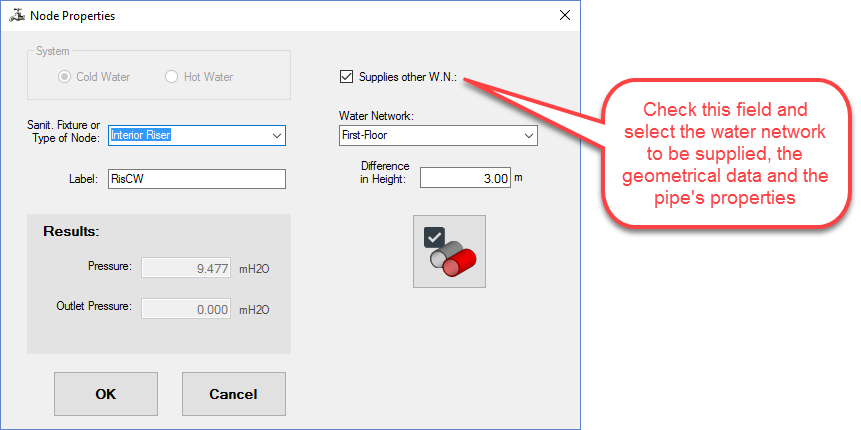 On the second water network, supplied from the previous one, there will be only one Interior Riser type of node, in which case you must change the type of node but keep the checkbox “Supplies other W.N” unchecked:

In this video, you will find the use of this type of node in the designing of the plumbing system of a single-family building with two stories.
And, in case something more “complex” is required, you can check the designing of the plumbing water system of an auditorium by clicking here.
-
Nodes with the “User Defined Fixture” type assigned allow you to create your own plumbing fixture in the sense that the Total and Specific Fixture Units to be used in the calculation and design can be entered in the corresponding fields.Additionally, for this type of node, you can set the fixture’s minimum operating pressure as well as its geometrical characteristics (height and diameter of the fixture supply pipe):
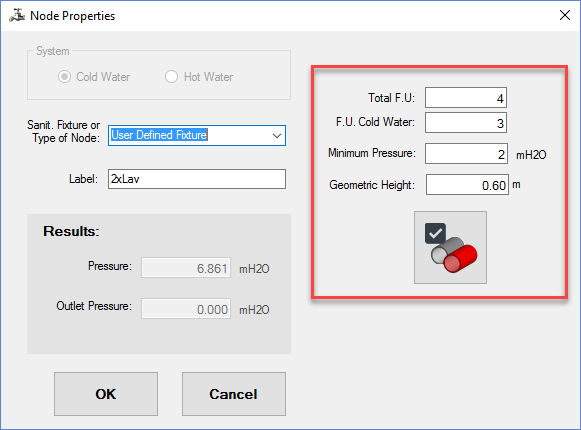 This type of node is useful in cases where multiple fixtures are supplied from a unique node, as in the case depicted in this video, where we have modeled two Lavatories in a single node.