This tutorial is for the interface and features of Version 1.1 of DREN-URBA.
With the release of Version 2.0 in November 2015, some features have been modified, as you will see in the corresponding tutorials.
In Urban Drainage Systems design, estimating the Maximum or peak stormwater flow through the Rational formula requires the engineer to determine, for a given frequency or return period, the value of the rainfall intensity for a given Time of Concentration.
It is here where Intensity-Duration-Frequency curves (IDF Curves), generated from the Probabilistic and Statistical study of the highest rainfall intensities for different durations in the basin under study, are necessary. These curves allow rainfall intensities, for different durations and return periods, to be obtained for a specific site.
Regional or local IDF Curves are available in most countries, generated by their respective Hydro meteorological services or highway agencies. These curves are often treated as a “Standard” to be used by urban drainage designers. In such a case this IDF curves are not available they need to be developed in order to include the rainfall characteristics in our study.
The importance of rainfall intensity data for different occurrence frequencies is essential because, generally, the design will be performed for a given frequency value and, once completed, a review of the urban drainage system’s performance should be done for longer return periods. Keep in mind that the higher the Return Period is, the higher the rainfall intensity will be, thereby leading to higher stormwater flows that need to be considered in some way in our designs. Thus, the design engineer may set, if applicable and for example, the storm drain Inlets required in main roads in order to maintain minimum spreads of flooding for low frequency rainfall intensities.
Regardless of where the Intensity-Duration-Frequency data comes from, in DREN-URBA it is possible to create a table in which the Intensity values for each frequency or return period will be stored, so that the user can easily evaluate the urban drainage system’s performance for peak flows calculated under different frequencies.
The Intensity-Duration-Frequency table creation should be the next thing to do after setting the Default parameters of any new project in DREN-URBA, as it is part of the basic data necessary for the determination of Stormwater Peak Flows.
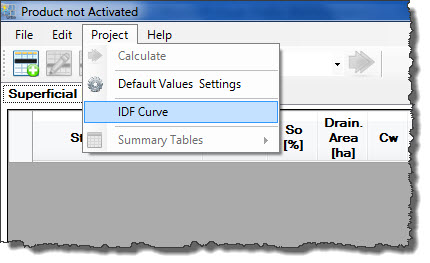
To create the Intensity-Duration-Frequency table in DREN-URBA, we must access the respective dialog by clicking the IDF Curve option in the Project Menu:
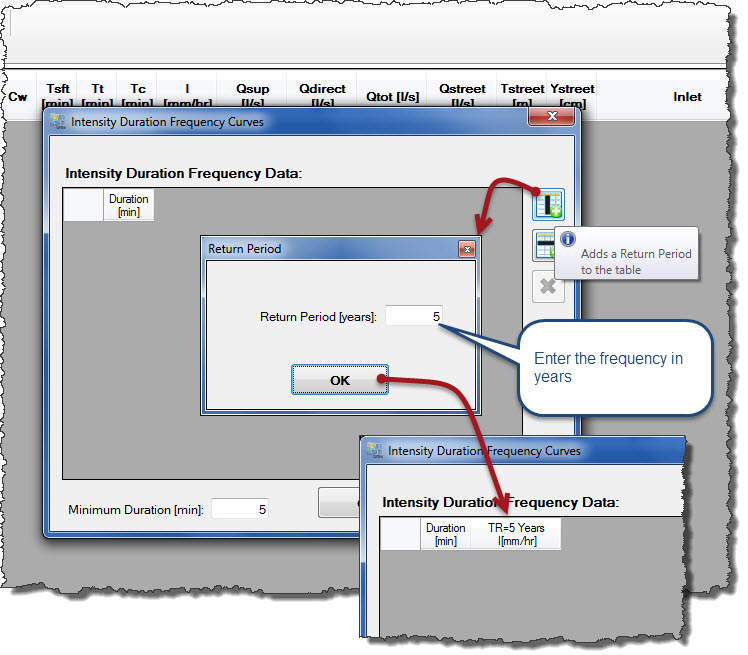
The Intensity-Duration-Frequency Curves Dialog will show, for a new project, a blank table, providing the buttons to create new columns (return period) and new rows (intensities for each duration and for each return period):

Additionally, as shown in the figure above, the minimum rainfall duration should be specified in this dialog, to use for selecting the respective intensity from the entered data. Thus, in relation to the value shown in the figure (5 min), if DREN-URBA determines that the duration (Time of Concentration) is, for example, 3,5 minutes, it will choose the intensity value for the selected return period, associated with five minutes, the minimum duration value specified in this dialog.
Clicking on the Add Return Period button, a dialog will be presented to enter its value in years. When you click OK, the respective column is created:
In this way, we can add other frequencies or return periods to our Intensity-Duration-Frequency table.
To enter the respective durations and intensities, we will click the Add Rainfall duration to create as many rows as are required:
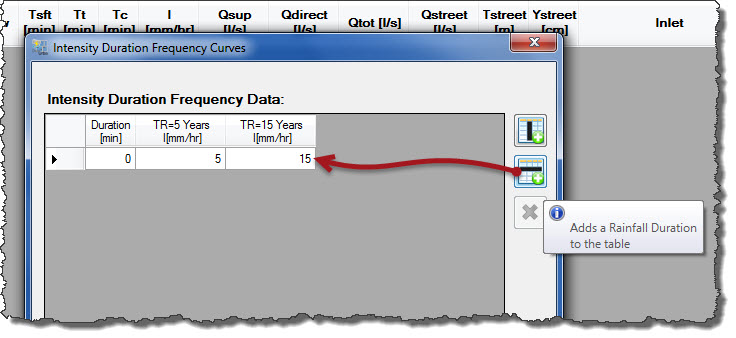
Thus we will introduce rainfall duration values with their respective intensities, in mm/hr, for each column or Return Period. At the end, we could have a table similar to this one:

Finally, to delete some of the rows (or columns) from the created table, you must select it by clicking on its header and later click the delete button:

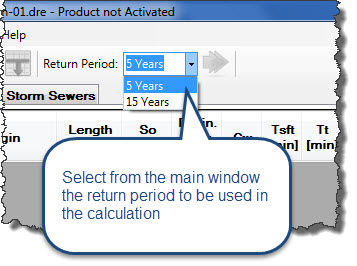
Closing the Intensity-Duration-Frequency Curves dialog, we can see, in the DREN-URBA’S main window, the available Return Periods, from which you must choose one before starting the stormwater drainage system design: