


Take off construction BOQ Items with more order, less repetition, and better consistency
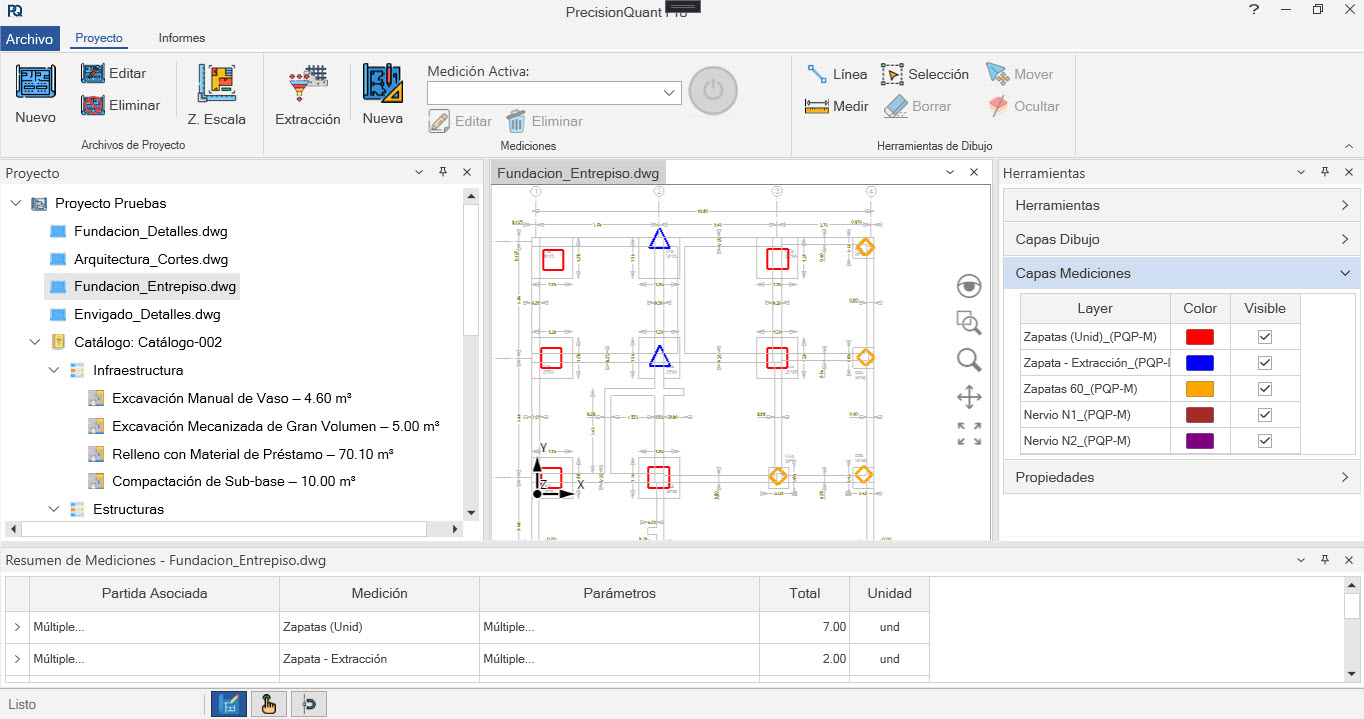
PrecisionQuant Pro (PQP) is a desktop application for BOQ takeoff in architecture and civil engineering projects.
If you work on quantity takeoff for masonry, structural work, finishes, and other BOQ Items in building construction projects, you already know that the problem is usually not just “measuring a line.”
The real problem starts afterwards: distributing quantities, repeating entries, adjusting openings, checking dimensions, and maintaining consistency across Line Items when the project changes.
PQP was designed precisely for that: to help you carry out quantity takeoff in a more structured, clearer way, and one that stays closer to the real needs of a project estimate.

Desktop application for quantity takeoff, BOQ item totaling, and quantity report generation in construction projects.
If you have ever had to carry out construction quantity takeoff, this will probably sound familiar...
Quantifying a project is not just about measuring.
It means going back and forth between drawings, dimensions, work items, calculation criteria, and revisions.
It means taking lengths, areas, counts, or concrete volumes.
It means reviewing walls, renders, columns, footings, beams, slabs, finishes, or repetitive project elements.
It means turning those measurements into useful quantities for the project estimate or for quantity reports.
And, in many cases, it also means repeating work because...
There is no need to dramatize it.
It is simply part of technical work.
And when that reality depends on manual or poorly structured procedures, the result is usually the same: more time than necessary, more room for inconsistencies, and less clarity when reviewing the work.
The problem is not measuring less. It is measuring with a better logic.
In many workflows, the Measurement remains isolated and then has to be manually turned into construction work items.
PQP proposes a different approach: the Measurement is created already connected to the BOQ items you are quantifying.
Some tools work as if the goal were simply to capture lines, areas, or counts on a drawing.
But in real construction work, that is rarely enough.
Because a Measurement on its own does not always mean much if it later has to be distributed, complemented, interpreted, or replicated across several construction work items.
PrecisionQuant Pro is built around a more useful idea for professionals who truly perform construction quantity takeoff:
working with structured Measurements, not isolated data.
This way, the Measurement stops being a loose note and becomes part of a quantity takeoff logic that is more consistent, closer to the project estimate, and easier to review afterwards.
This first walkthrough shows something simple, but important: a Measurement does not stay in the drawing. It has a direct impact on the associated work item...
When a quantity depends on variables, the Measurement must also be structured accordingly
In construction, many quantities do not come from a single figure taken directly from the drawing.
They come from relationships:
That is part of everyday technical work.
That is why one of PQP’s most powerful capabilities is the ability to work with parameter-based Measurements.
Not to make the process more complicated, but to make it more faithful to the way many construction quantities are actually calculated.
In practice, this can be applied to situations such as:
The advantage is clear:
if the result depends on variables, those variables should be built into the Measurement.
And when you change a parameter, the calculation updates.
With more order.
With better consistency.
And with less need to redo work that should already have been properly structured from the start.
This video shows PQP’s logic more clearly: a Measurement is not just a number. It can respond to Complementary Parameters that govern the result:
Measure once — impact multiple BOQ items with consistency
This is one of PrecisionQuant Pro’s most important differentiators.
In most construction projects, the same Measurement does not end up affecting just one work item.
That is because the building element you are quantifying usually has more than one implication.
A wall, for example, is not always relevant only because of its surface area.
It may also be related to render, blocks, paint, or other associated items.
A structural element may affect concrete, formwork, steel, or complementary items.
When the workflow forces you to repeat that same basis several times, you are not really "gaining more control". In many cases, you are simply duplicating effort.
PQP allows a different way of working:
a single Measurement can feed multiple items, while maintaining Dimensional Consistency and updating at the same time the results that depend on it.
Typical approach
With PrecisionQuant Pro
This is the point where many professionals quickly understand PQP’s value: the Measurement stops being an isolated element and becomes a useful basis for quantifying related items.
Automatically deduct vertical openings you cannot see in plan view
Doors, windows, and other vertical voids can affect walls, finishes, and coatings, even when they do not appear directly in the Measurement you are carrying out.
In construction work items such as walls, finishes, or coatings, the problem is not just deducting a door or a window...
The real problem is that, when working from 2D drawings, those voids are not always directly present in the Measurement you are taking.
And, when the adjustment depends on remembering it later, the risk increases: something may be left out, deducted where it should not be, or require extra time to review whether everything was properly related.
That is why PrecisionQuant Pro incorporates a logic of emitters and receivers, designed to handle these situations automatically, with more order and less reliance on manual corrections.
The goal is not to impress with complexity.
The goal is to solve an everyday problem more effectively.
This example shows how certain interactions between Measurements can be handled more systematically, minimizing part of the manual adjustment that usually consumes time and attention:
Some project elements should not be quantified as a simple isolated line, area, or count.
Doors, windows, columns, footings, and other repetitive components usually follow a more structured logic: typical details, with different dimensions or variants depending on the models defined in the construction project.
For these cases, PQP includes Parametric Extraction, a function that helps model those elements and generate Measurements with better consistency, stronger Traceability, and a clearer relationship to the project’s technical logic.
The advantage is very practical:
you can work from a typical detail and its different variants, letting the associated formulas and parameters handle a large part of the repetitive work for you.
Instead of treating each case as if it were a new and independent Measurement, you can carry out quantity takeoff with a more uniform logic, one that is faster to review and more faithful to the way those elements are actually defined in the project.
Not every user will need this from day one.
But it is an important capability for those who work with repetitive typical elements and want to quantify them with more order and less manual reconstruction of the calculation.
See this function in detail by clicking here.
Doing quantity takeoff properly also means being able to present the work properly
In many cases, you also need to review, document, organize, and present the work clearly.
That is why PQP is not focused only on generating quantities.
It also allows you to create reports that complement the final result with more context and stronger Traceability.
You will be able to generate reports that complement quantity documentation, such as:
This makes both, internal review and the presentation of the completed work, much clearer and more organized.
It is not just about arriving at a total.
It is also about understanding where it comes from and being able to report it clearly.
PrecisionQuant Pro may be especially useful to you if…
It may be a good fit for you if…
It may not be the right tool for you if…
A license for work that continues
PrecisionQuant Pro is available on an annual subscription basis, an option designed to support the use of the program, its ongoing development, and the support professionals need in their day-to-day work.
The subscription includes:
A licensing model intended for professionals and small firms that need a specialized tool to quantify construction work items with ease.
Frequently Asked Questions about PrecisionQuant Pro
Quantity takeoff will always require technical judgment.
The goal is to make sure it does not force you to repeat unnecessary work.
PrecisionQuant Pro is not intended to replace the judgment of the architect, the engineer, or the professional carrying out the quantity takeoff.
What it aims to do is something much more useful:
to help you work with a logic that is more organized, more structured, and closer to the way construction work items actually behave within a project.
If that way of working matches what you need, the next step is simple:
You can also subscribe for €120/year

Copyright © 2025, HidraSoftware